My laptop has everything on it. Code, keys, half-finished projects, a setup I've been tuning for months and never want to redo. It's a Dell Precision 5520 running Fedora with KDE, and when I'm not home, I still want to use it. Not carry it. Use it.
So it stays home, plugged in, lid closed, and I reach it from wherever I am. A cybercafe, a friend's PC at their place, or just my phone with Termux. A terminal over SSH most of the time, the full desktop over RDP when I need it, files over scp and rsync.
It all just works. This post is about why it works, layer by layer.
Why you can't just connect
My laptop at home has an address like 192.168.1.10. That's a private address. It only means something inside my home network. On the internet, my whole home shows up as one public address that belongs to the router, and every device behind it shares it. The trick that makes that work is NAT.
When my laptop sends something out, the router rewrites the sender to its own public address and keeps a note: "this conversation belongs to the laptop". When the reply comes back, it checks the note and forwards it in.
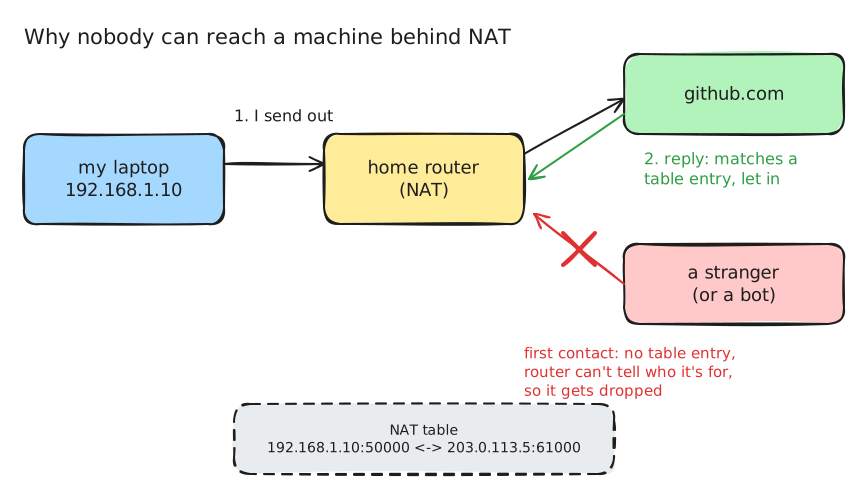
A packet from outside that nobody asked for has no note. The router has no idea which device it's for, so it drops it. NAT lets replies in, never first contact. And reaching my laptop from a cybercafe is first contact by definition.
The usual answer is port forwarding: tell the router "anything on port 22 goes to the laptop". That's dead for me before it starts. My connection is behind CGNAT, where the ISP puts thousands of customers behind one more NAT of its own, so my router doesn't even have a public address to forward from. And even with one, an open port 22 isn't open to me. It's open to every bot scanning the internet, which is the opposite of how I like to handle access.
Tunnel services like ngrok or Cloudflare Tunnel do work. But every byte goes through someone else's server, free plans have limits, and the URLs keep changing. Not what I want for a machine I reach every day.
A network only my devices are on
What I actually want isn't my laptop on the internet. It's my devices on their own private network, wherever each of them physically is. That's all a VPN really is: a virtual network card on each device, and a program that takes every packet sent to it, encrypts it, wraps it in a normal UDP packet and ships it over the real internet. SSH on both ends only ever sees the inner packet. The internet only ever sees encrypted UDP.
The protocol doing this for me is WireGuard, and it's a nice piece of design:
- Keys, not passwords. Every device has a key pair, and its public key is its identity.
- The address is tied to the key. A packet claiming to come from my phone's VPN address only gets accepted if it was encrypted with my phone's key. Faking an address means stealing the device.
- It's silent. It doesn't answer anything that isn't authenticated, so to a port scanner it looks like nothing is there.
- It doesn't care if you move. There's no connection to drop. When my phone switches from Wi-Fi to mobile data, WireGuard just follows the new address and my SSH session keeps going.
Plain WireGuard leaves two jobs to you, though. Every device needs every other device's public key, and every device still has to be reachable, which is the NAT problem all over again.
Tailscale does the rest
Tailscale is WireGuard plus a coordination server that handles both.
Each device generates its own keys, and the private key never leaves it. The coordination server only collects public keys and hands every device a map: here's every other device, its key, its address, and where it might be reachable. The actual traffic then goes directly between my devices, encrypted with keys the server never had. It does the introductions and never hears the conversation.
Every device gets a stable 100.x.x.x address, borrowed from the range reserved for CGNAT because it's never used on the public internet, and a name through MagicDNS. So I type a name, not an address.
The clever part is getting two devices behind NAT to talk directly at all:
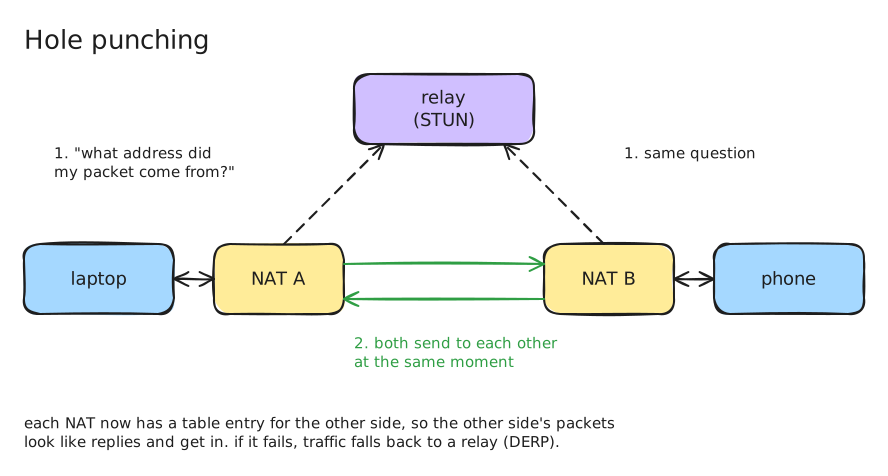
Each device asks a relay what its address looks like from outside. They swap those addresses, and both send packets to each other at the same moment. Each router sees its own device sending out first and makes a note, so the other side's packets arrive looking like replies and get in. That's hole punching. When it can't work, traffic goes through Tailscale's DERP relays over plain HTTPS. They only ever pass along packets that are already encrypted, so they can't read anything. Connections actually start on a relay and quietly upgrade to direct once the hole punch works, which is why the first ping is sometimes slower than the rest. When it never upgrades, everything still works, just slower, and you feel it when scrolling a remote desktop.
Two locks, not one
Once the private network exists, each service still decides what it accepts, and there are two separate locks: where the program listens, and what the firewall allows. On Fedora, firewalld gives each network interface its own zone.
| Listens on | Firewall on home Wi-Fi | Firewall on Tailscale | |
|---|---|---|---|
| SSH (port 22) | every network | blocked | allowed |
| RDP (port 3389) | only the Tailscale address | would pass, but nothing listens there | allowed |
Either lock alone is enough. Both together means one mistake doesn't expose anything. The catch is that the Tailscale interface sits in the trusted zone, so every device on my tailnet can reach everything on the laptop. The tailnet is only as safe as its least careful device, which is what Tailscale's access rules are for if you want the phone to reach only SSH and RDP.
What SSH does every single time
Once there's a path, a surprising amount happens between pressing enter and getting a prompt. It comes down to three pieces of cryptography.
Key exchange. The two machines need a shared secret to encrypt the session with, agreed over a network anyone can watch. The classic way to picture Diffie-Hellman is paint:
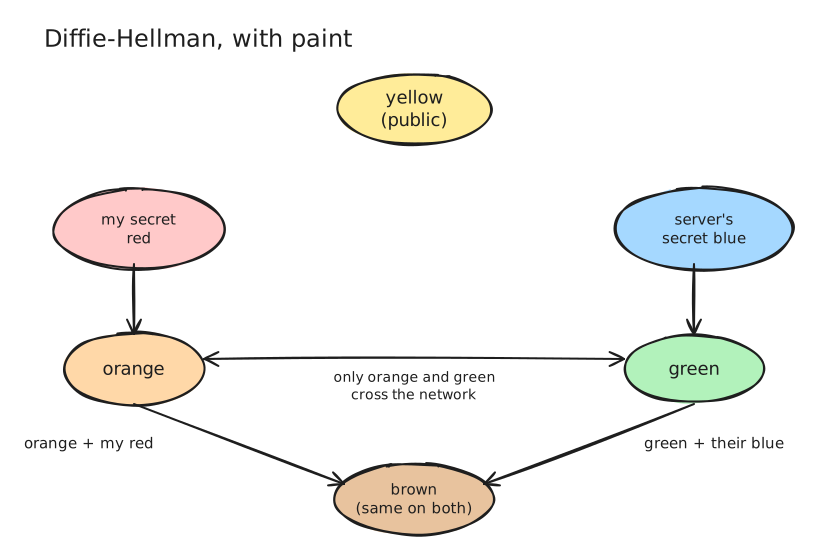
Both sides start from the same public yellow, each mixes in a secret color, and they swap only the mixes. Each adds its own secret to the other's mix, and both end up with the same brown. Anyone watching saw yellow, orange and green, and you can't un-mix paint. The secret colors are thrown away afterwards, so even if a key leaks later, recorded sessions stay unreadable.
The host key. Key exchange alone can't stop someone in the middle doing the paint trick with both sides. So the server signs its half with its host key, a permanent key that identifies that machine. That's what the "authenticity of host can't be established" prompt is about, and why SSH saves the key in known_hosts. If it ever changes, you get the big "REMOTE HOST IDENTIFICATION HAS CHANGED" warning and SSH refuses to connect until you check. Usually it's innocent, the machine got reinstalled and made new keys. But a reinstalled server and an attacker look exactly the same from your side, so SSH stops and makes you look.
Your key. Password login sends the password to the server. Key login sends nothing secret. The server checks my public key is in authorized_keys and asks me to sign something that includes this session's unique id. My private key never leaves my laptop, and the signature is useless in any other session. My SSH keys are Ed25519, which can't encrypt anything at all. They only sign. The session's encryption comes entirely from the key exchange.
It's also how one laptop is four different GitHub accounts. They all connect to the same git@github.com, and GitHub tells them apart purely by which key signed in. A short alias per account in my SSH config picks the key, and the key picks who I am.
Moving files
scp and rsync don't have network protocols of their own. Both ride inside an SSH connection and get all of the above for free.
scp has a fun detail: since OpenSSH 9.0, it quietly uses the SFTP protocol underneath, because the old way ran commands through the remote shell and kept causing security bugs. Same command, different mechanism.
rsync is what I use for anything bigger than a file or two. It skips files whose size and modified time haven't changed, and for files that did change, it only sends the blocks that differ. With --partial, an interrupted transfer picks up where it stopped instead of starting over.
Remote desktop on Wayland
When a terminal isn't enough, I use RDP. Modern RDP mostly encodes the changed parts of the screen as H.264 video, so a still screen costs almost nothing, and what decides how it feels is latency more than bandwidth.
Linux adds a twist. On X11, any app could read the whole screen and inject keyboard and mouse input, which made remote desktop easy and keyloggers easier. Wayland locked that down: only the compositor sees the screen. The standard way for an app to ask is a portal that pops up "allow this app to share your screen?", which is useless on a laptop at home with nobody in front of it.
So I run KDE's own RDP server, krdp, started by hand instead of from the settings page, with two choices:
- KDE's own protocols instead of the portal. krdp is a trusted part of KDE, so it asks KWin for the screen and input directly. No dialog, nobody has to click allow.
- Listening only on the Tailscale address. RDP simply doesn't exist outside my tailnet.
krdp runs inside my logged-in session and shares that exact desktop. After a reboot, SSH comes straight back because it's a system service, but RDP waits until someone logs in. That's how it's designed.
The day it went dark
My favourite failure so far. I was in the middle of something over SSH and the session froze. Someone at home had switched the charger off.
I knew exactly what had happened. My lid-closed setting says "just turn the screen off", but only on AC. On battery, KDE's default kicks in: lid closed means sleep. A sleeping laptop is off the network, and nothing I send can wake it. Knowing that didn't help one bit. I waited till I got home.
This is the part I actually like
You can set up everything in this post by following a guide. Install Tailscale, enable SSH, done. It'll work. Most days you'll never think about it again.
But the day it stops working, the guide is useless. The fix for my charger problem isn't in any Tailscale doc, because it's not a Tailscale problem. It's a power profile that only applies on battery. The reason RDP doesn't come back after a reboot isn't a bug, it's how Wayland and krdp are designed. You only find that by knowing what's underneath.
That's the difference I care about. Asking an AI for a MERN app and shipping whatever it gives you is fine, but it isn't really engineering. Engineering is sitting there at 3am because one specific thing won't work, and going down layer by layer until you know why. It's spending two weeks building a tool because the existing ones hold your token and you don't trust them. It's knowing that your SSH key only signs, that your router drops strangers, and that your laptop has three different opinions about what a closed lid means.
None of this is new. SSH is decades old, NAT is older than me. But I use all of it every day, and knowing what it's doing is the whole point.