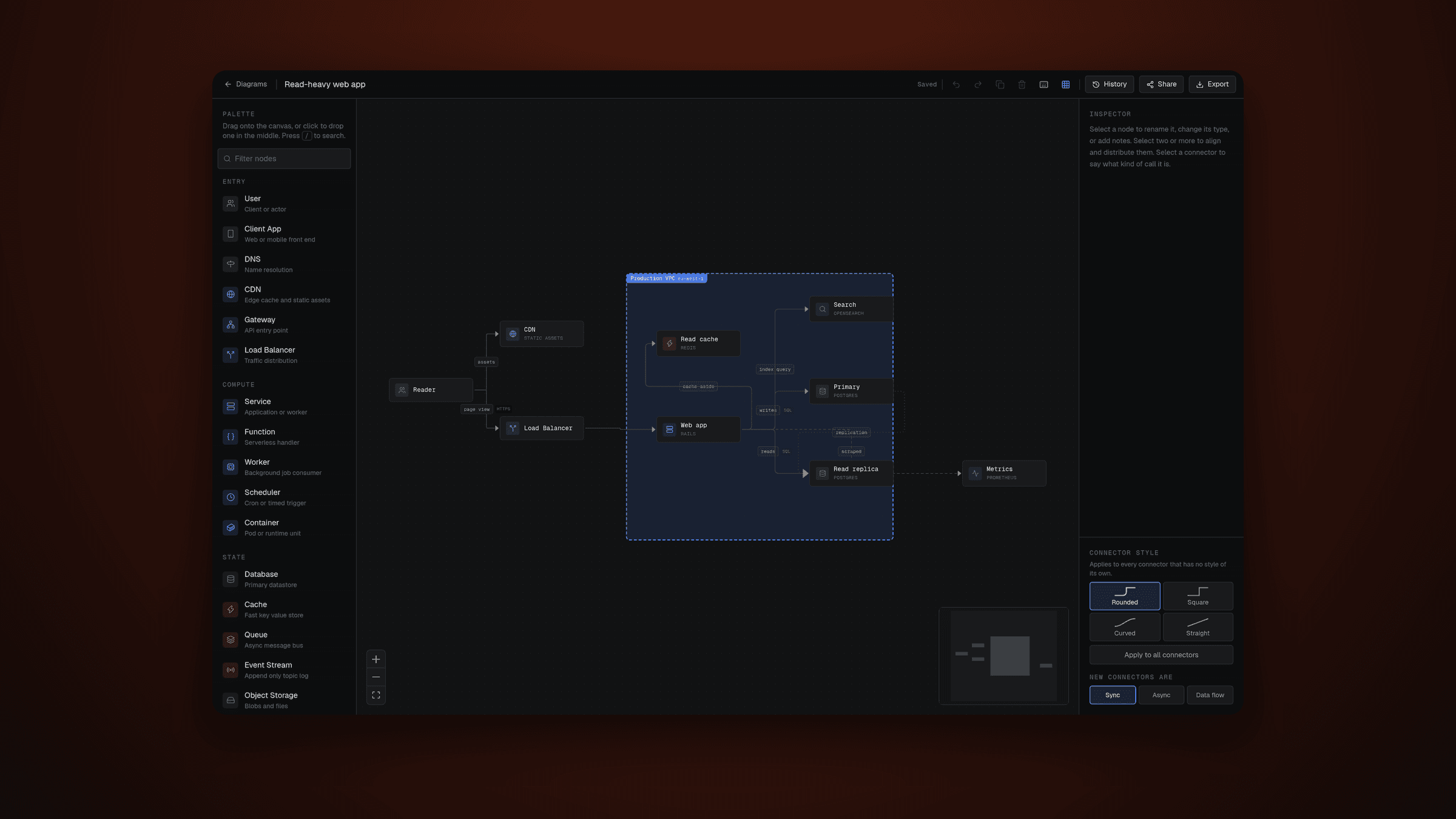
Drawing a system design diagram in a general-purpose drawing tool is a strange experience.
You know exactly what you want. A client, a gateway, two services, a queue, a database. That is five shapes, six arrows, and roughly eleven seconds of actual thinking.
Instead you draw a rectangle. Then you resize the rectangle. Then you type "API Gateway" into the rectangle. Then you copy that rectangle so the next one is the same size, because if it is not the same size you will notice it for the rest of your life.
The tool has no idea what any of it means. It sees rectangles. You are the one holding the architecture in your head, and the tool charges you a tax in mouse movements for the privilege.
That tax is the entire reason this exists.
It already knows what a gateway is
SystemCanvas is not a drawing tool. It is a canvas that understands the things you are drawing.
You drag a piece out of the palette — user, gateway, service, cache, database, queue, and about twenty more — and it arrives already shaped, already coloured, already labelled with something sensible you can immediately overwrite. You connect them. You are done.
That sounds like a small distinction. It changes what the diagram is.
Because once the canvas knows a database is a database, your diagram stops being a picture and becomes something with meaning in it. And something with meaning can be turned into other things. Which is how you get this for free:
Your diagram exports to Mermaid and PlantUML. Draw it once, paste it into a README, a design doc, or a pull request as real text that lives in version control instead of a screenshot that goes stale the moment someone changes the architecture.
You can export an image too, when a picture is genuinely what you need.
The arrows were lying
The first version drew every connection the same way, which is the thing most diagrams do and the thing that makes most diagrams slightly dishonest.
A service calling another service over gRPC and a service dropping an event onto a topic are not the same relationship. One blocks. One does not. If both are a plain arrow, the diagram is hiding the single most important property of the system.
So a connector now carries what kind of call it is: synchronous, asynchronous, or a data flow that is bulk movement rather than a request at all. Each one draws differently, and each one writes a different arrow token in every export, so the distinction survives leaving the canvas. There is a slot for the transport too, which is why the screenshot says gRPC and SQL and HTTPS in small type beside the labels.
Nodes got the same treatment. A boundary is a resizable box that means a VPC, a region, or a trust zone, and anything you drop into it becomes its child and moves with it. A note is just text you leave for whoever opens this next. Neither is a component, so both are skipped by the exporters, except that a boundary turns into a Mermaid subgraph, because that is exactly what it is.
One deliberate limit: the nesting is one level deep and it stays that way. A boundary never goes inside another boundary. It keeps validation from having to walk a tree, and I have never once drawn a diagram that needed more.
No AI, on purpose
There is no diagram generation anywhere in this.
That was deliberate. The bottleneck was never "I don't know what my architecture looks like." It was the eleven seconds of thinking drowning in two minutes of rectangle management.
Fix the two minutes. The eleven seconds were never the problem.
The same instinct decided what you land on. There is no landing page. / resolves straight to the editor on the diagram you were last working on, or a new one the first time. There is nothing to read before you can draw, and I am not going to put a hero section between you and the canvas so I can tell you about the canvas.
A blank canvas is the honest default and a terrible first impression, so a new diagram can start from a real one instead: a checkout flow, a URL shortener, a read-heavy app inside a VPC. Reading someone else's diagram teaches the vocabulary faster than any tour would.
You can just use it
Open it and start drawing. No account, no sign-up wall, nothing to configure. Your work is saved on your machine.
Sign in and it moves to the cloud instead, which gets you the things that only make sense with an account:
It saves as you go, so there is no moment where you lose twenty minutes because you did not think to press anything.
It keeps your history. Every save is a point you can go back to, and you can name the ones worth naming — before the queue, what we actually shipped. Going back to an old version does not throw away anything newer, so you cannot lose work by exploring. That is the only version of this feature I trust myself to actually use.
You can share a diagram with a link for the people who need to see it and do not need an account to do so.
The share links were a door I did not know I had left open
This is the part of the story I would rather have skipped.
The first backend was a hosted platform where the browser talks to the database directly, with a public key in the page and row level policies deciding what that key is allowed to see. Share links were one boolean: is_public, and a policy that let anyone read a diagram where it was true.
Which is correct, for one diagram at a time.
The thing I had not thought about is that the same key also reaches the list endpoint. The policy said "public diagrams are readable". It did not say "one at a time, by id, if you already have the id". So anyone could enumerate every public diagram anyone had ever shared. Not a breach of anything private, but the exact opposite of what "share this link with my team" is supposed to mean.
I moved off it. Not in a panic, and not because the platform was wrong. Because I had been treating the database as a place the browser is allowed to go, and I wanted every read to go through code I had written.
So authorization lives in one place now: findOwnedProject, the single gate every Route Handler goes through, plus one separate read for the share page that checks is_public and nothing else. There are no policies, because there is no browser-facing credential left to police. A share link is /share/<id> with an id you already have, and there is no endpoint anywhere that hands out a list of them.
Accounts came home at the same time, to a library that puts sessions in my own Postgres. Two things fell out of that which I did not expect and now would not give up. Signing out actually signs you out, on the next request, because a session is a row I can delete rather than a token quietly living out its clock. And the sign-in page is mine, so it looks like the rest of the app instead of a vendor card dropped into it.
What it cost me is real and I will not pretend otherwise: there is no mail transport wired up, so there is no password reset. Forget your password today and it is gone. That is the honest trade for owning the whole thing, and it is the next thing to fix.
The database went the same way. It is a connection string now, not a vendor, which took the region question from "migrate everything" down to "change one variable."
Where it actually is
The canvas, accounts, saving, history, share links, and the exports all work.
Billing is not started, because billing needs a payment account and a week of my attention and I have not wanted that week yet.
There is no CI. The tests pass, tsc passes, eslint passes, and absolutely nothing runs them when I push, which is a sentence I am writing down specifically so it annoys me later.
systemcanvas.in is registered and not pointed anywhere yet, which is the most honest possible status for a side project.
What I would keep
Two early decisions are the reason everything after them was easy.
The first was making the canvas understand its own pieces rather than treating them as shapes. There is one registry of node types and one component that renders all of them, so adding a kind of node is one entry in a file instead of a project, and every export got easier the moment the diagram meant something.
The second was letting the whole thing work with no account at all. It kept the door open — you can try it in ten seconds — and it forced the saved-locally and saved-to-cloud paths behind the same interface, so signing in changes where your work lives and nothing else about how it feels. The cloud half is the same set of functions over the network, which is the only reason swapping the entire backend was a week and not a rewrite.
The thing I would do differently is less fun and more useful: I would have written tests much earlier. Not for the satisfying reasons. Because the first genuinely bad bug I hit was one where a single malformed diagram could take down a whole shared page — and a visitor looking at that link had no way to fix it and no idea what went wrong.
Postgres will happily store any valid JSON, including a node with no label and a size of NaN, and then hand it back weeks later to a renderer that has no idea what to do with it. So documents are now cleaned on the way in, not on the way to the screen: a broken node is dropped, an orphan is promoted back to the top level, and anything unrecognisable degrades to an empty diagram rather than throwing.
That is the worst place to discover a problem: somewhere the person seeing it is not the person who can do anything about it. One bad piece should never cost you the whole picture. It does not anymore, and that rule came out of exactly one afternoon I would rather not repeat.